Highlights
•No reboot required. Creating, installing and removing of virtual serial ports occurs at real time;
•You can create any number of virtual serial ports pairs;
•Any other hardware or virtual serial ports are not used or occupied;
•You even can have no serial ports in your system;
•Other applications will never see the difference between real serial port and virtual serial ports, created by Virtual Null Modem software;
•The link between two virtual serial ports is faster then real null-modem cable connection and depends on your computer system speed;
•The virtual link is much more reliable than common physical link;
•Virtual Null Modem uses kernel driver technology and supports: WDM, WMI, Power Management, PNP, etc.;
•Virtual Null Modem software has a simple, menu-driven step by step set-up. Programming is not required to configure the software to configure virtual serial ports and virtual serial ports pairs;
•If you are software developer, then you can configure each port to sumulate a real-world data exchange with errors in data.
Once the program is launched, the main program window is opened (fig. 7). It is the configuration window. This image below shows the Virtual Null Modem screen with its various parts labeled.
| 1. | Menu bar - Menus are described in the Menus section of this help file; |
| 2. | Virtual Null Modems list - contains a list with virtual null modems created; |
| 3. | Auto start box - allows to configure VNM start with Windows. If this box is checked, next time you boot no virtual serial ports will be created. Otherwise you should start VNM application and click the "OK" button; |
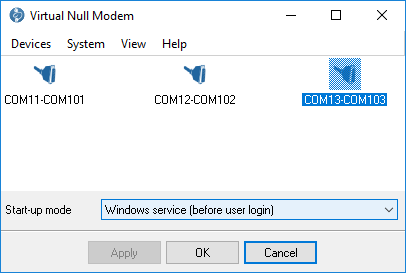
Fig. 7. The main program window.
The menus of Virtual Null Modem are located on the menu bar. The sub-menus of the main menu are Devices, System, View and Help. Each item in these menus is described in this section below. Some menu functions are also activated by pressing combinations of keys on the keyboard (called "Hotkeys" in this Help file)
Another way to access some edit menu functions is to click the right button of the mouse. See the help paragraphs on each function for more information. Hotkeys are described thus: "Ctrl+N" means that the user holds the Ctrl key down while simultaneously pressing the N key. The appropriate keyboard shortcuts and toolbar buttons are shown with each menu item.
After adding serial port pairs you should click the "OK" button to apply all changes. If it's first time, when you had added serial port pairs, then Virtual Null Modems software will install drivers and it can take few minutes on slow computers, please, wait while Virtual Null Modems software adding new virtual devices. This process will be accompanied by messages in the system tray like as fig. 8 and 9. This messages will apper for each virtual serial port in the list. Next time Virtual Null Modems software will not display this messages and will use drivers installed before.
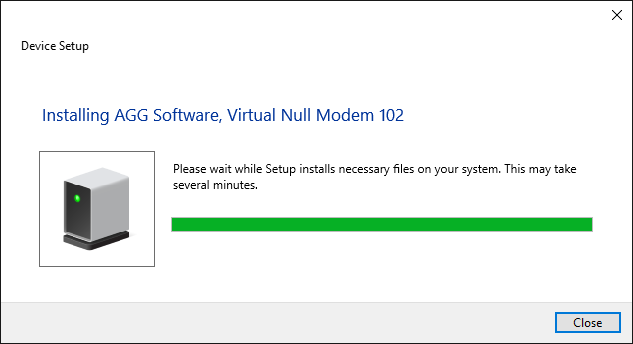
Fig. 8. Virtual Null Modems software adds a virtual serial port.

Fig. 9. Virtual Null Modems software installs drivers.
After installing drivers new virtual devices will appear in the device manager (see fig. 10).
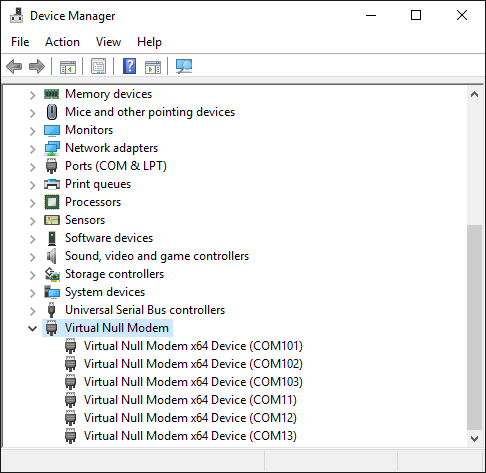
Fig. 10. Virtual Null Modems devices in the devices manager.
Now you can use these serial ports (a serial port number showed in brackets) in your software as a common hardware serial port.